 ShortsFactory
🎮 Gaming YouTubers · Streamers
Why gaming YouTubers can't make Shorts
Your long-form is fun and well made, but it doesn't get reach. You know you should do Shorts, but after gaming and editing long-form there aren't enough hours in the day.
Now it's main PC for gaming, second PC for ShortsFactory. Shorts and long-form edits get made while you play.
There are four reasons
It's not about editing skill. It's about time.
Your long-form is great. But nobody finds it
Everyone who watches says it's fun, yet your subscriber count doesn't move. Long-form is watched by people who already watch you — there's no door for new viewers.
You know Shorts are that door
Yesterday's stream had three or four Shorts-worthy moments. The comeback round, the ridiculous death, the second chat exploded. They're all sitting in the VOD.
Gaming + long-form editing + Shorts = not enough hours in the day
Five hours of streaming and the long-form edit — you manage somehow. Shorts mean rewatching those five hours, cropping vertical and adding captions. Every day.
You need sleep too — isn't there someone who can do it?
So Shorts become "later". This page is the answer to that "someone".
No wonder so many gaming YouTubers only stream live and can't post even one long-form video a week.
The ones who do post either outsource or are big creators. Small channels can't even think about it.
Does that mean small creators lack talent? No.
Their only fault is starting late and not having time.
ShortsFactory is the program that gives you that time back.
Main PC for gaming, second PC for ShortsFactory
Most gaming YouTubers have a second computer. Open ShortsFactory in its browser. That's all.
Game, stream, create
Keep doing what you do. Spend your time only on making fun videos. The nights you spent editing become stream time.
ShortsFactory edits
Upload yesterday's VOD and your raw recordings, and Shorts and long-form videos come out while you play. 10 to 30 minutes is enough.
Stream VOD → several Shorts
Upload the five-hour VOD as is and pin the fun rounds. It cuts vertical Shorts from those parts and adds captions, titles and descriptions. Gameplay goes full screen; with a facecam, use vertical crop. Post straight to YouTube, Instagram and TikTok.
Raw recording → finished long-form
Upload an unedited recording and it cleans up bad takes, repeated lines and slow stretches, picks the scenes and adds captions for a finished long-form video. Title and description copy plus thumbnail candidates come with it. Original quality is kept — 4K stays 4K.
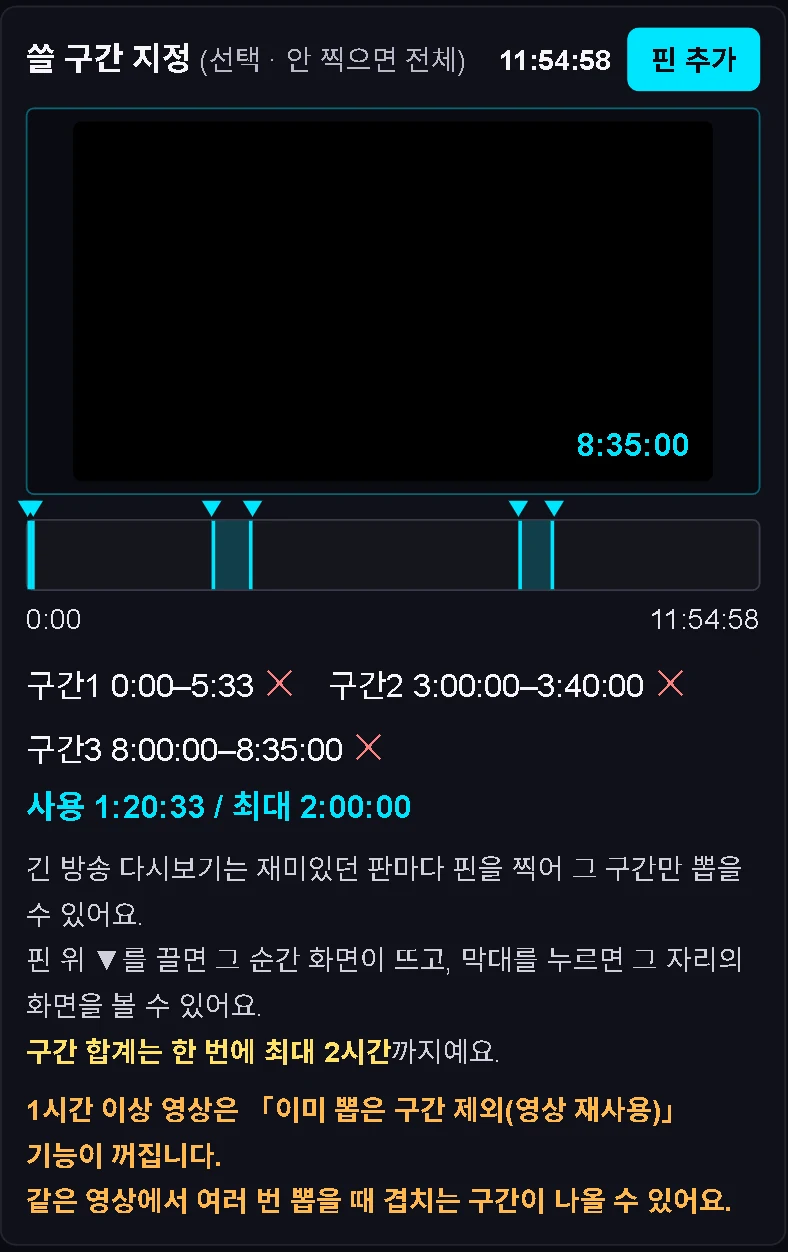
A real screen: three pins in an 11 h 54 min VOD. Only these sections are cut into Shorts.
“Now I just play games”
Hive edits the Shorts. The Long-form Editor edits the long-form.
All those nights spent cutting, cropping vertical, adding captions and writing titles disappear. Your job is making fun gaming videos — and uploading them to your second PC.
Stream more, and get your Shorts and long-form here. No need to hire a YouTube editor.
I'm good at this. My videos are genuinely fun.
If YouTube hasn't noticed yet, compete on Shorts volume. Show what you can do.
Your videos are not boring. They just don't get enough exposure.
Spend the nights you used to edit on streaming, and let your second PC turn out the Shorts.
Never give up. We'll supply the volume.
Try it with yesterday's stream
No card needed. One VOD is enough.
Added once on sign-up · every feature included
Titles, captions and layout included · long-form editing uses the same wallet
FAQ
Does it work with Twitch VODs?
Yes. Upload the VOD file or your OBS recording as is. Up to 12 hours and 100GB per file. For YouTube Live, the file you download from YouTube Studio is lighter and faster.
I only have gameplay, no facecam
That works. Choose "Full screen" to put the gameplay into a vertical Short as is. If your stream has a facecam, "Vertical crop" follows the person.
How long does a five-hour VOD take?
Pin the fun rounds and only those parts are processed. Up to 2 hours of pinned footage in one go, and 10 to 30 minutes is enough. No waiting on all five hours.
I was about to hire a YouTube editor
Work out the per-video rate in your job post × videos per day × 30 days. Here, Shorts and long-form editing come out of the same credit wallet. No job post, interviews or sample checks — start today, get results today.
I already have an editor
Hand off Shorts and long-form cut editing here, and give your editor only the videos that need real creative direction. Your editor no longer rewatches five hours, so the same budget produces far more videos.
How much does it cost?
You get $5 of free credit once when you sign up — no card needed. Titles, captions and layout are all included, and credits are only used when a job succeeds. See the pricing table below for plans.
Pricing Launch price
Shorts maker + Nunshera (YouTube scheduled uploads)
Coming soon+ Shora: fully automatic shopping, issue, knowledge and recipe Shorts
Coming soon+ Trend Detector for long-form and Shorts (reference scripts)
Coming soon+ Nunshera for 20 channels · 5 team seats sharing one plan
Coming soon- $1 = 1,000 credits. Higher plans include more bonus credits.
- Yearly billing: 2 months free.
- Monthly credits reset on your renewal date.
- Paid plans open soon. Need more than 20 channels? Custom plans available.